Hono and React realtime app
https://zenn.dev/jp/articles/2026-02-22-hono-and-react-realtime-app
↑ 日本語版
Hono is said to be the web standard framework with the highest satisfaction in the world₍₁₎. In this article, we build a realtime application by combining Hono with React.
We walk through how to ship nearly zero cost authentication and persistence, which are essential for any production service. Run the following command to scaffold the project from a Hono template.
% npm create hono@latest

> npx
> create-hono

create-hono version 0.19.4
✔ Target directory app
✔ Which template do you want to use?
cloudflare-workers+vite
✔ Do you want to install project dependencies? No
✔ Cloning the template
HonoX file-based routing is not used in this article. If you want to use it, please refer to the previous article.
Diff so far:
https://github.com/tseijp/voxelizer/pull/17/changes
1. setup react and hono
1.1. Pre-development setup
Run the following command to install all required packages.
npm i react react-dom swr tailwindcss
npm i -D @auth/core @auth/drizzle-adapter @hono/auth-js @tailwindcss/vite @types/react @types/react-dom @vitejs/plugin-react drizzle-kit drizzle-orm partyserver partysocket
Edit "tsconfig.json" to set "jsxImportSource": "react" so that JSX is processed by React.
{
  "compilerOptions": {
    "target": "ESNext",
    "module": "ESNext",
    "moduleResolution": "Bundler",
    "strict": true,
    "skipLibCheck": true,
-    "lib": ["ESNext"],
+    "lib": ["ESNext", "DOM"],
-    "types": ["vite/client"],
+    "types": ["vite/client", "@cloudflare/workers-types"],
    "jsx": "react-jsx",
-    "jsxImportSource": "hono/jsx"
+    "jsxImportSource": "react"
  }
}
Other settings are up to your preference!
- Adding "DOM" to "lib" enables browser API type completions.
- Adding "@cloudflare/workers-types" to "types" enables Workers Bindings types.
1.2. Backend changes
Remove all SSR-related code from the backend. (You can delete "src/renderer".tsx as well.) Then replace the vite plugin configuration with react and tailwind.
-
// src/index.tsx
import { Hono } from 'hono'
export default new Hono().get('/api/res', (c) => c.text('ok'))
// src/renderer.ts REMOVE -
// vite.config.ts
import { cloudflare } from '@cloudflare/vite-plugin'
import { defineConfig } from 'vite'
-import ssrPlugin from 'vite-ssr-components/plugin'
+import react from '@vitejs/plugin-react'
+import tailwindcss from '@tailwindcss/vite'
export default defineConfig({
-  plugins: [cloudflare(), ssrPlugin()],
+  plugins: [cloudflare(), react(), tailwindcss()],
})
1.3. Frontend changes
Add the minimal React and Tailwind CSS setup to the frontend. "src/style.css・src/client.tsx・index.html" — create the usual three files.
-
/* src/style.css */
@import 'tailwindcss'; -
// src/client.tsx
import './style.css'
import { createRoot } from 'react-dom/client'
createRoot(document.getElementById('root')!).render('ok') -
<!-- index.html -->
<script src="/src/client.tsx" type="module"></script>
<div id="root" />
Start the server with "npm run dev". If both of the following pages display "ok", you're good to go.
Diff so far:
https://github.com/tseijp/voxelizer/pull/18/changes
2. setup infra and auth
2.1 oauth authentication setup
Set up the authentication infrastructure using Google OAuth.
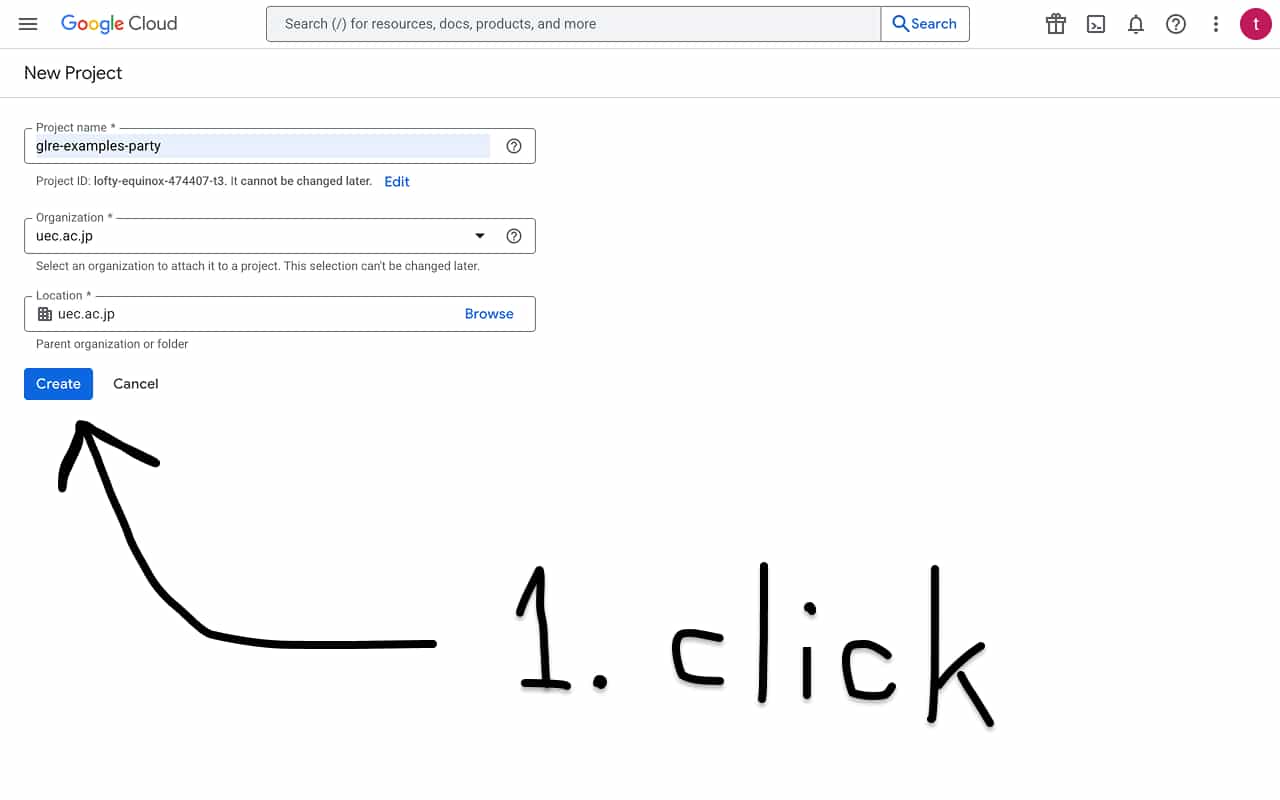
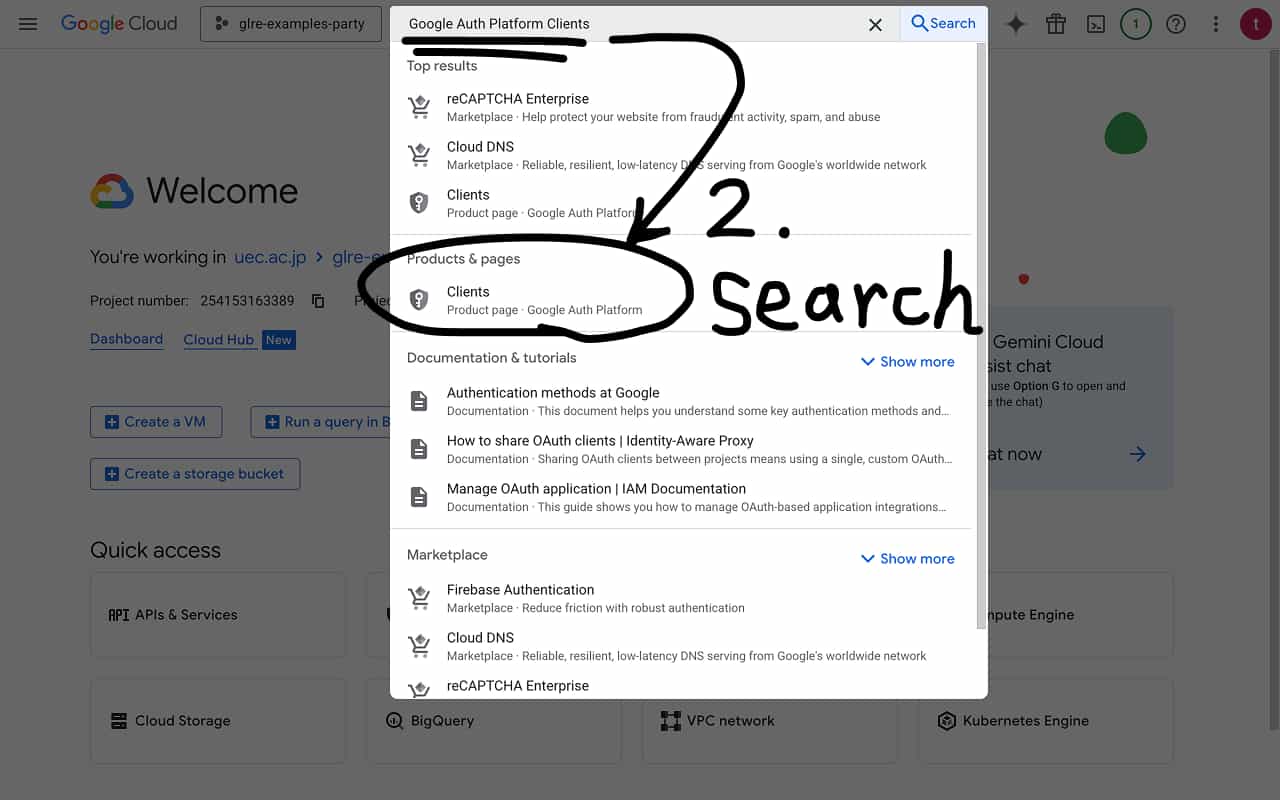
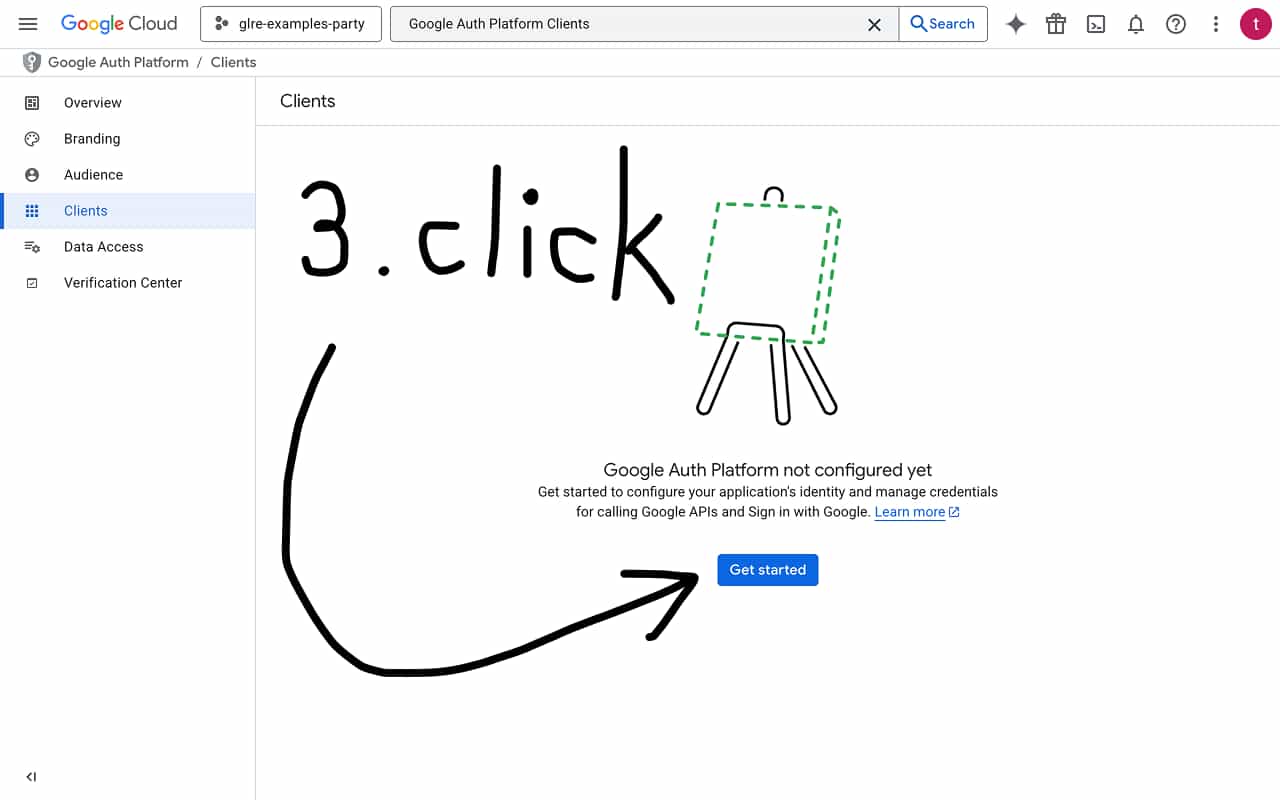
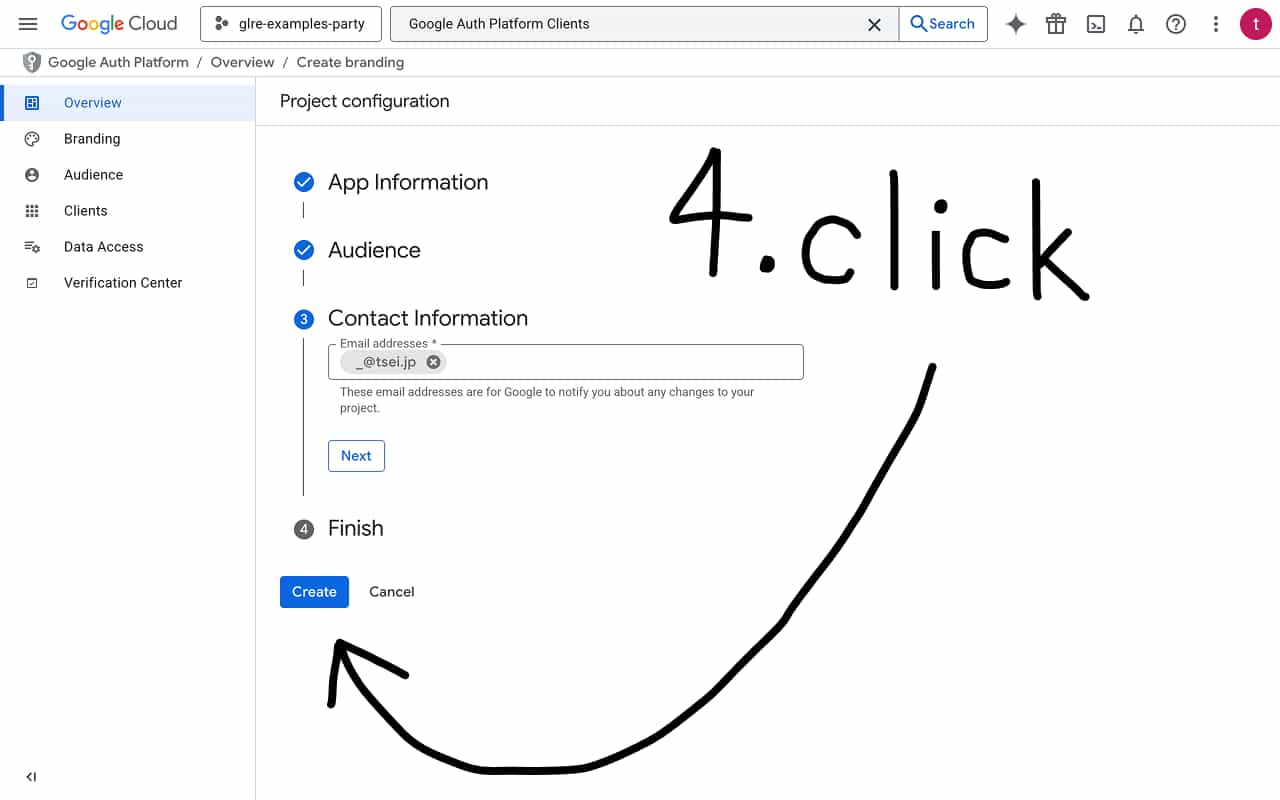
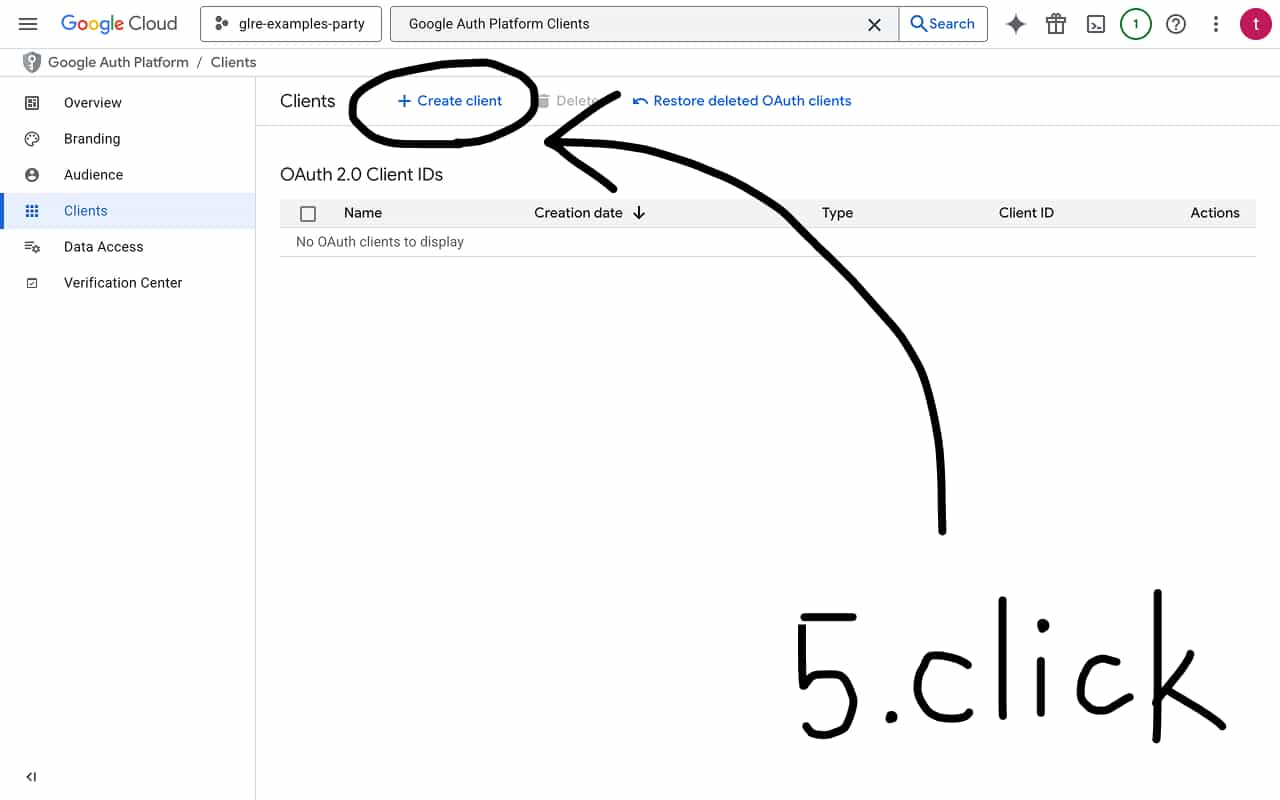
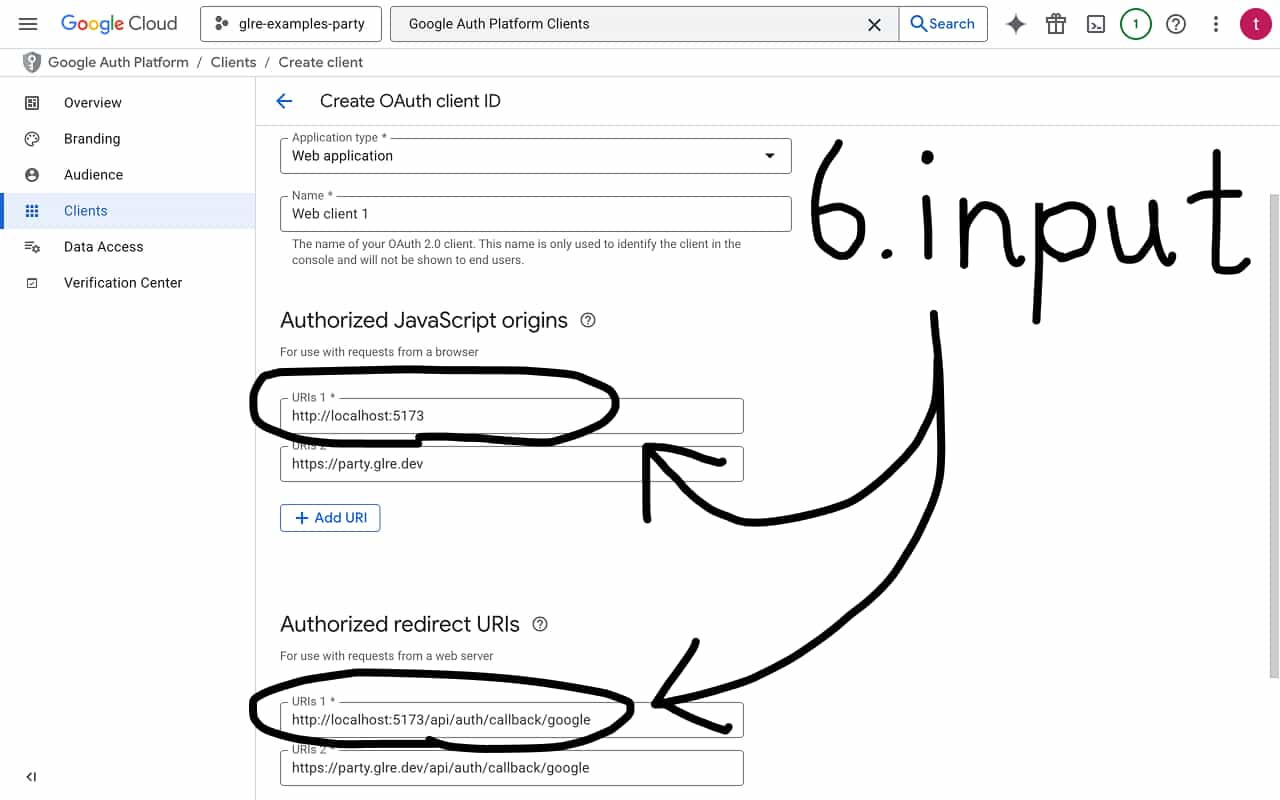
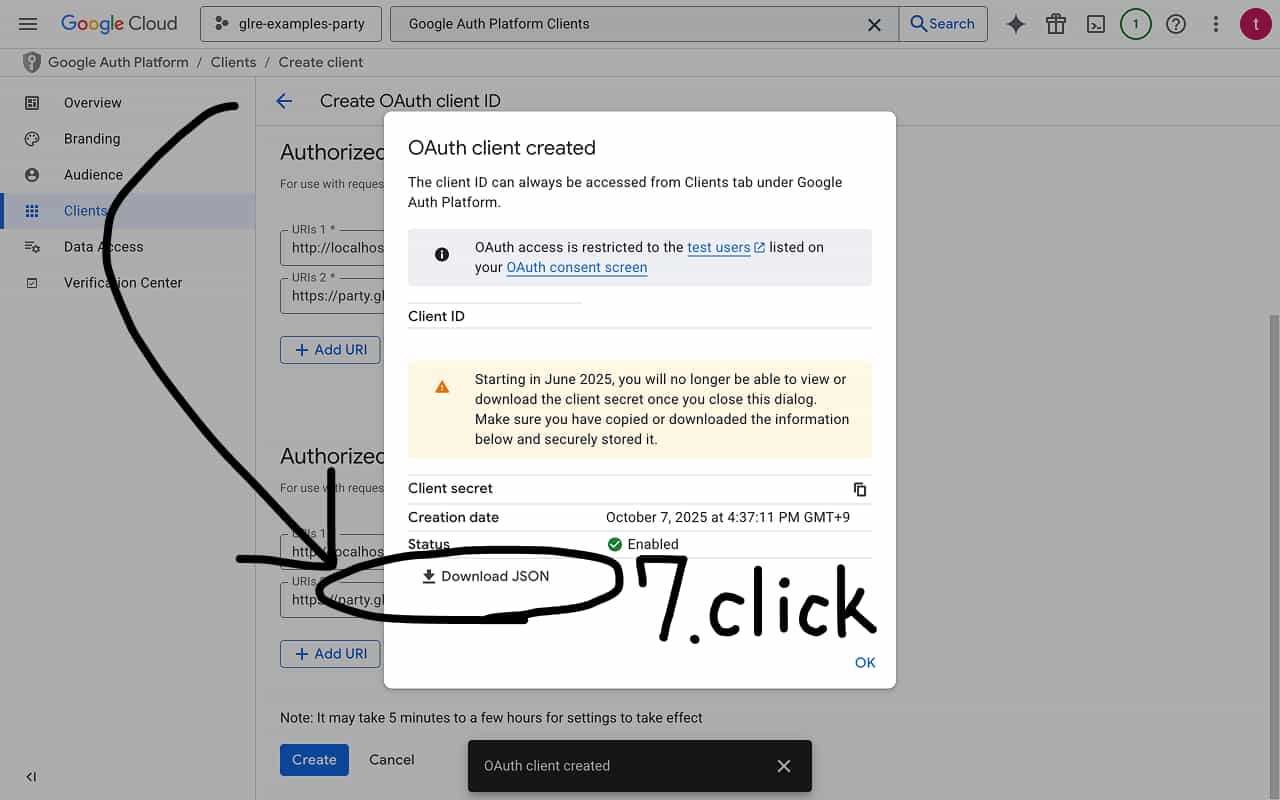
- Click the create button on Google Cloud Console New Project
- Search for "Google Auth Platform Clients" and open the "Clients" page that appears
- If branding has not been created yet, click the "Get started" button
- Fill in the fields and click the create branding button
- Once branding is created, click the "Create client" button
- Select Web application and enter the following values (you will need to add the production URL after deployment)
Authorized JavaScript origins: http://localhost:5173
Authorized redirect URIs: http://localhost:5173/api/auth/callback/google - Click the Download JSON button on the modal that appears (it should look like this)
{
  "web": {
    "client_id": "xxxxxxxxxxxx-xxxxxxxxxxxxxxxxxxxxxxxxxxxxxxxx.apps.googleusercontent.com",
    ...
    "client_secret": "GOCSPX-xxxxxxxxxxxxxxxxxxxxxxxxxxxx"
  }
} - Create a ".dev.vars" file and set the environment variables based on the downloaded JSON
AUTH_URL = "http://localhost:5173/api/auth"
AUTH_SECRET = "random"
GOOGLE_CLIENT_ID = "xxxxxxxxxxxx-xxxxxxxxxxxxxxxxxxxxxxxxxxxxxxxx.apps.googleusercontent.com"
GOOGLE_CLIENT_SECRET = "GOCSPX-xxxxxxxxxxxxxxxxxxxxxxxxxxxx"
- "AUTH_URL" should point to localhost during local development. Replace it with the production URL after deployment.
- "AUTH_SECRET" should be a random string generated with "openssl rand -base64 32".
- "GOOGLE_CLIENT_ID" and "GOOGLE_CLIENT_SECRET" are taken from "web.client_id" and "web.client_secret" in the downloaded JSON.
- After deploying to production, set the same environment variables on the Cloudflare Console as well.
- If a ";" semicolon gets into ".dev.vars", the environment variables will not be read correctly.(
"editor.formatOnSave": truein ".vscode/settings.json" may automatically append semicolons on "Ctrl+S")
2.2 Adding the database schema
Define the schema so that authentication data is persisted when a user signs up. The schema code is taken straight from the Auth.js and Drizzle ORM official docs.
-
// drizzle.config.ts
import type { Config } from 'drizzle-kit'
export default {
  out: './migrations',
  schema: './src/schema.ts',
  dialect: 'sqlite',
} satisfies Config -
// src/schema.ts
import { integer, sqliteTable, text, primaryKey } from 'drizzle-orm/sqlite-core'
import type { AdapterAccountType } from '@auth/core/adapters'
export const users = sqliteTable('user', {
  id: text('id')
    .primaryKey()
    .$defaultFn(() => crypto.randomUUID()),
  name: text('name'),
  email: text('email').unique(),
  emailVerified: integer('emailVerified', { mode: 'timestamp_ms' }),
  image: text('image'),
})
export const accounts = sqliteTable(
  'account',
  {
    userId: text('userId')
      .notNull()
      .references(() => users.id, { onDelete: 'cascade' }),
    type: text('type').$type<AdapterAccountType>().notNull(),
    provider: text('provider').notNull(),
    providerAccountId: text('providerAccountId').notNull(),
    refresh_token: text('refresh_token'),
    access_token: text('access_token'),
    expires_at: integer('expires_at'),
    token_type: text('token_type'),
    scope: text('scope'),
    id_token: text('id_token'),
    session_state: text('session_state'),
  },
  (account) => [primaryKey({ columns: [account.provider, account.providerAccountId] })]
)
export const sessions = sqliteTable('session', {
  sessionToken: text('sessionToken').primaryKey(),
  userId: text('userId')
    .notNull()
    .references(() => users.id, { onDelete: 'cascade' }),
  expires: integer('expires', { mode: 'timestamp_ms' }).notNull(),
})
export const verificationTokens = sqliteTable(
  'verificationToken',
  {
    identifier: text('identifier').notNull(),
    token: text('token').notNull(),
    expires: integer('expires', { mode: 'timestamp_ms' }).notNull(),
  },
  (verificationToken) => [primaryKey({ columns: [verificationToken.identifier, verificationToken.token] })]
)
export const authenticators = sqliteTable(
  'authenticator',
  {
    credentialID: text('credentialID').notNull().unique(),
    userId: text('userId')
      .notNull()
      .references(() => users.id, { onDelete: 'cascade' }),
    providerAccountId: text('providerAccountId').notNull(),
    credentialPublicKey: text('credentialPublicKey').notNull(),
    counter: integer('counter').notNull(),
    credentialDeviceType: text('credentialDeviceType').notNull(),
    credentialBackedUp: integer('credentialBackedUp', {
      mode: 'boolean',
    }).notNull(),
    transports: text('transports'),
  },
  (authenticator) => [primaryKey({ columns: [authenticator.userId, authenticator.credentialID] })]
)
- The official documentation may use an outdated syntax for composite primary keys. Change the third argument of "sqliteTable" to return an array instead of an object. Otherwise, you will get the following deprecation warning.
The signature '(name: "account", columns: { userId: NotNull<SQLiteTextBuilderInitial<"userId", [string, ...string[]], number | undefined>>; type: NotNull<$Type<SQLiteTextBuilderInitial<"type", [...], number | undefined>, AdapterAccountType>>; ... 8 more ...; session_state: SQLiteTextBuilderInitial<...>; }, extraConfig?: ((self: { ...; }) => SQLiteTableExtraConfig) | undefined): SQLiteTableWithColumns<...>' of 'sqliteTable' is deprecated.
2.3 Creating Cloudflare Bindings
- Run the following commands to verify your Cloudflare authentication status.
npx wrangler login
npx wrangler whoami - Run the following commands to generate Cloudflare configuration. Copy the output text into "wrangler.jsonc".
npx wrangler d1 create my-d1-xxx
npx wrangler r2 bucket create my-r2-xxx - Run the following commands to generate migrations and apply them to both local and remote. (Since it runs on CDN Edge SQLite, it should stay free.)
npx drizzle-kit generate
npx wrangler d1 migrations apply --local my-d1-xxx
npx wrangler d1 migrations apply --remote my-d1-xxx - Add the Durable Objects configuration directly to "wrangler.jsonc". (There is no CLI command to create Durable Objects.)
{
  ...
  "durable_objects": {
    "bindings": [
      {
        "name": "v1",
        "class_name": "PartyServer"
      }
    ]
  },
  "migrations": [
    {
      "tag": "v1",
      "new_sqlite_classes": ["PartyServer"]
    }
  ],
  ...
}
- The default value of "migrations_dir" is "migrations". This corresponds to
out: './migrations'in "drizzle.config.ts". (Migrations · Cloudflare D1 docs) - If
"remote": truewas auto-generated, remove it. (During local development, it will try to access the remote D1 and fail.) "$schema": "node_modules/wrangler/config-schema.json"path changes in monorepo setups.- Enabling "observability" activates the Workers monitoring dashboard.
- Setting "keep_vars" to true prevents Console environment variables from being cleared on each deploy.
- Refer to the following for "wrangler.jsonc".
{
  "$schema": "node_modules/wrangler/config-schema.json",
  "name": "party",
  "compatibility_date": "2025-08-03",
  "main": "./src/index.tsx",
  // ↓↓↓ my created ↓↓↓
  "durable_objects": {
    "bindings": [
      {
        "name": "v1",
        "class_name": "PartyServer"
      }
    ]
  },
  "migrations": [
    {
      "tag": "v1",
      "new_sqlite_classes": ["PartyServer"]
    }
  ],
  // ↓↓↓ generated by `npx wrangler d1 create my-d1-party` ↓↓↓
  "d1_databases": [
    {
      "binding": "my_d1_xxx",
      "database_name": "my-d1-xxx",
      "database_id": "9571c20b-357e-40ec-83fb-068584ca7f52",
      "migrations_dir": "migrations"
    }
  ],
  // ↓↓↓ generated by `npx wrangler r2 bucket create my-r2-xxx` ↓↓↓
  "r2_buckets": [
    {
      "bucket_name": "my-r2-xxx",
      "binding": "my_r2_xxx"
    }
  ],
  // ↓↓↓ recommend ↓↓↓
  "observability": {
    "enabled": true
  },
  "keep_vars": true
}
Diff so far:
https://github.com/tseijp/voxelizer/pull/19/changes
3. reatitime app
3.1 fix Backend
The backend implements Google OAuth authentication and a relay middleware to partyserver, a Durable Objects-based WebSocket library.
// index.tsx
import { users } from './schema'
import Google from '@auth/core/providers/google'
import { DrizzleAdapter } from '@auth/drizzle-adapter'
import { authHandler, initAuthConfig, verifyAuth } from '@hono/auth-js'
import { eq } from 'drizzle-orm'
import { drizzle } from 'drizzle-orm/d1'
import { Hono } from 'hono'
import { env } from 'hono/adapter'
import { createMiddleware } from 'hono/factory'
import { routePartykitRequest, Server } from 'partyserver'
import type { Connection, ConnectionContext } from 'partyserver'

const getUserBySub = (DB: D1Database, sub: string) => drizzle(DB).select().from(users).where(eq(users.id, sub)).limit(1)
const authMiddleware = initAuthConfig((c) => ({
  adapter: DrizzleAdapter(drizzle(c.env.my_d1_xxx)),
  providers: [Google({ clientId: c.env.GOOGLE_CLIENT_ID, clientSecret: c.env.GOOGLE_CLIENT_SECRET })],
  secret: c.env.AUTH_SECRET,
  session: { strategy: 'jwt' },
}))
const myMiddleware = createMiddleware(async (c) => {
  const headers = new Headers(c.req.raw.headers)
  headers.set('x-user-sub', c.get('authUser')?.token?.sub!)
  const req = new Request(c.req.raw, { headers })
  const res = await routePartykitRequest(req, env(c))
  return res ?? c.text('Not Found', 404)
})

type Env = { my_d1_xxx: D1Database; my_r2_xxx: R2Bucket }
type Conn = Connection<{ username: string }>

export class PartyServer extends Server<Env> {
  users = {} as Record<string, string>
  static options = { hibernate: true }
  async onConnect(conn: Conn, c: ConnectionContext) {
    const sub = c.request.headers.get('x-user-sub')!
    const [user] = await getUserBySub(this.env.my_d1_xxx, sub)
    conn.setState({ username: user.name! })
  }
  async onMessage(conn: Conn, message: string) {
    this.users[conn.state!.username] = message
    this.broadcast(JSON.stringify(this.users))
  }
  onClose(conn: Conn) {
    delete this.users[conn.state!.username]
    this.broadcast(JSON.stringify(this.users), [conn.id])
  }
}

export default new Hono<{ Bindings: Env }>()
  .get('/api/res', (c) => c.text('ok'))
  .use('*', authMiddleware)
  .use('/parties/*', verifyAuth())
  .use('/parties/*', myMiddleware)
  .use('/api/auth/*', authHandler())
  .use('/api/v1/*', verifyAuth())
  .get('/api/v1/me', async (c) => {
    const { token } = c.get('authUser')
    if (!token || !token.sub) return c.json(null, 401)
    const [user] = await getUserBySub(c.env.my_d1_xxx, token.sub)
    return c.json({ username: user.name || null })
  })
3.2 fix Frontend
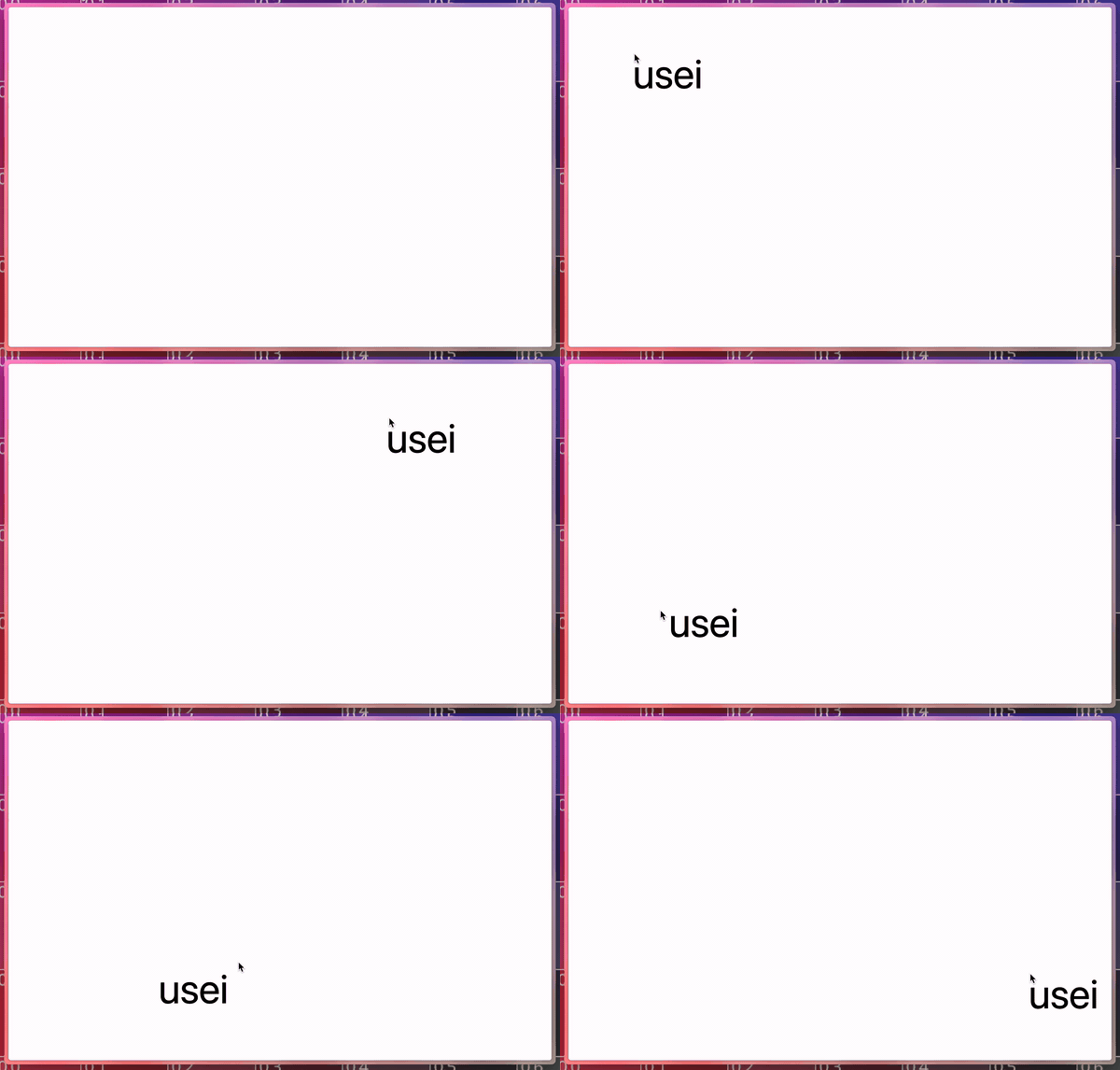
As a simple first example, we implement an app that shares Google account usernames and mouse cursor positions via WebSocket.
// client.tsx
import './style.css'
import { signIn } from '@hono/auth-js/react'
import { usePartySocket } from 'partysocket/react'
import { useState } from 'react'
import { createRoot } from 'react-dom/client'
import useSWRImmutable from 'swr/immutable'

const Cursors = () => {
  const [users, set] = useState<[username: string, transform: string][]>([])
  const socket = usePartySocket({
    party: 'v1',
    room: 'my-room',
    onOpen: () => addEventListener('mousemove', (e) => socket.send(`translate(${e.clientX}px, ${e.clientY}px)`)),
    onMessage: (e) => set(Object.entries(JSON.parse(e.data))),
  })
  return users.map(([username, transform]) => (
    <div key={username} className="absolute text-8xl" style={{ transform }}>
      {username}
    </div>
  ))
}
const fetcher = async () => {
  const res = await fetch('/api/v1/me')
  return await res.json()
}
const App = () => {
  const { data } = useSWRImmutable('me', fetcher)
  if (!data) return <button onClick={() => void signIn()}>Sign In</button>
  return <Cursors />
}

createRoot(document.getElementById('root')!).render(<App />)
Open localhost and it looks like this!
3.3. reatitime game
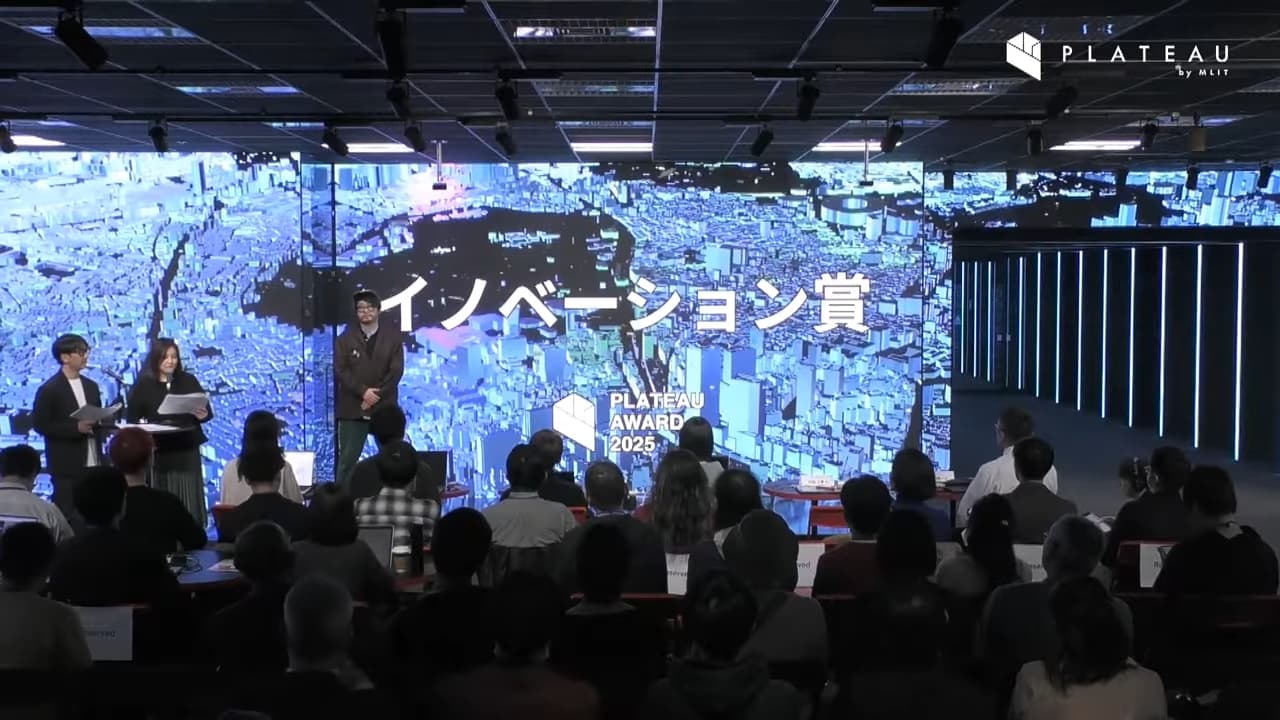
We recently received the Innovation Award at PLATEAU AWARD — a government-led open 3D city data initiative in Japan. It voxelizes the Tokyo 23 wards' city model and enables route search using hierarchical pathfinding "HPA*".
navigator.glre.dev
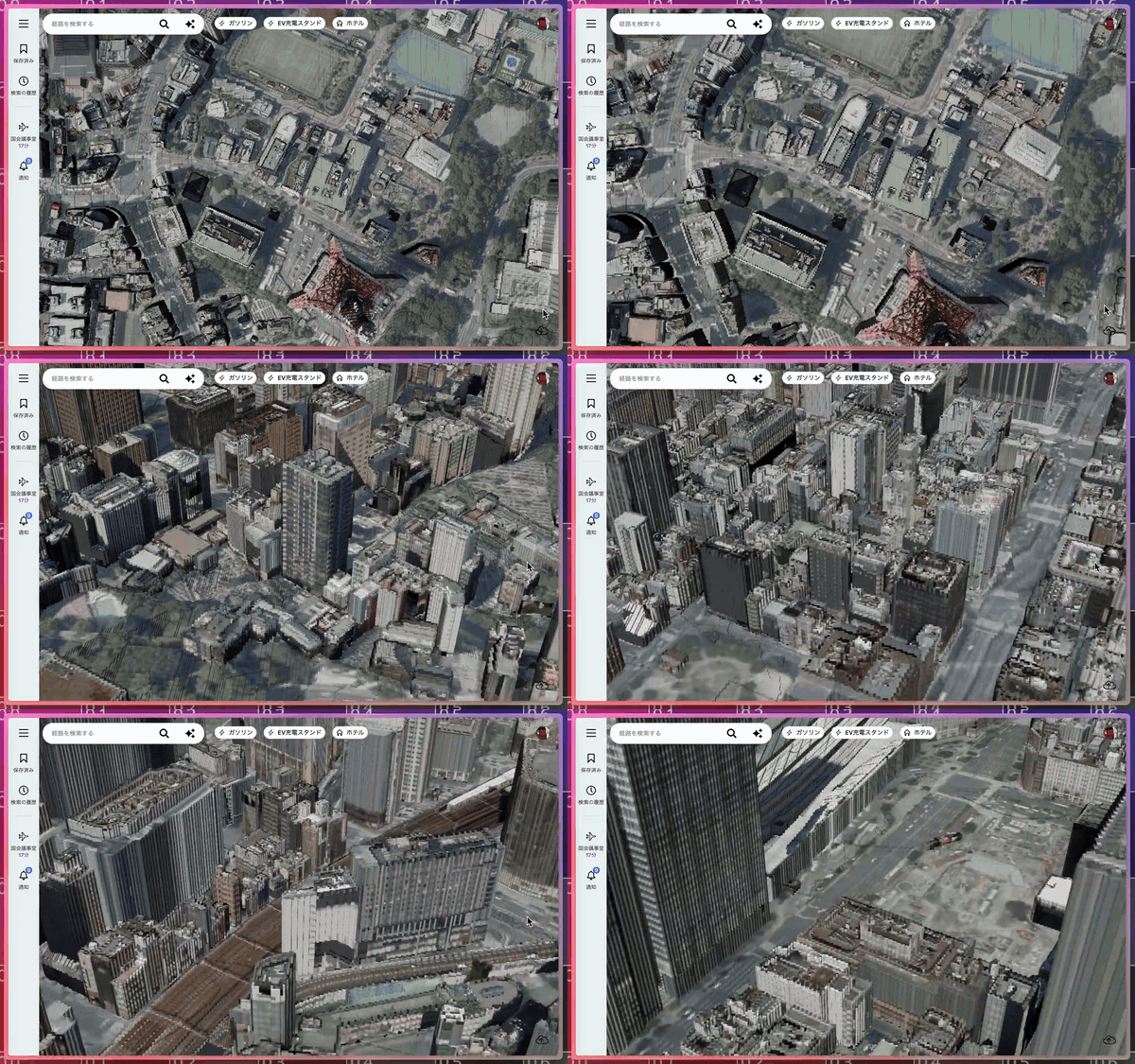
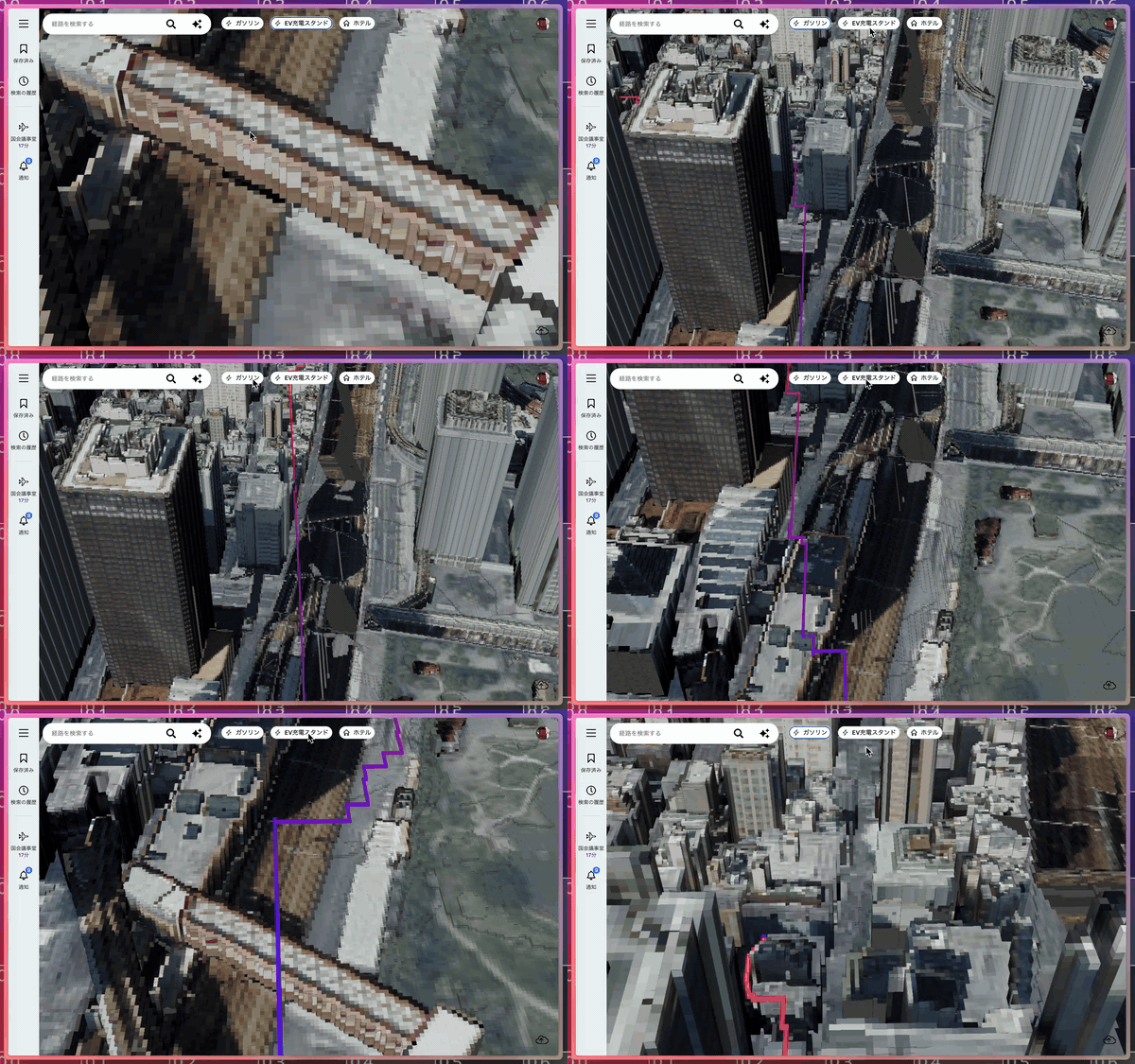
- service: navigator.glre.dev
- require: navigator.glre.dev/claude/ja
- proposal: navigator.glre.dev/readme/ja
- schedule: docs.google.com/spreadsheets
We tried out realtime communication using voxelizer with the setup from this article. Rewriting "client.tsx" for voxelized city looks something like this.
code: client.tsx
import './style.css'
import { signIn } from '@hono/auth-js/react'
import { usePartySocket } from 'partysocket/react'
import { useState } from 'react'
import { createRoot } from 'react-dom/client'
import useSWRImmutable from 'swr/immutable'
import { Drag, GL, useGL } from 'glre/src/react'
import { box, capsule } from 'glre/src/buffers'
import { If, float, Scope, instance, mat4, uniform, vec3, vec4, varying } from 'glre/src/node'
import { createCamera, createMesh, createScene, range } from 'voxelized-js/src'
import VoxelWorker from './worker?worker'
const createUsers = () => {
  const mvp = uniform<'mat4'>(mat4(), 'mvp')
  const geo = capsule({ radius: 0.4, height: 1.4 })
  const pos = instance<'vec3'>(vec3(), 'pPos')
  return {
    mvp,
    gl: {
      vert: mvp.mul(vec4(geo.vertex('pVertex').add(pos).add(vec3(0.5)), 1)),
      frag: vec4(vec3(0.1, 1, 0.3), 1),
      uniforms: { mvp: null },
      instances: { pPos: null },
      attributes: { pVertex: null, pNormal: null },
      count: geo.count,
      instanceCount: 0,
      wireframe: true,
      isWebGL: true,
      isDepth: true,
    },
  }
}
const createWorld = () => {
  const mvp = uniform<'mat4'>(mat4(), 'mvp')
  const geo = box()
  const pos = instance<'vec3'>(vec3(), 'pos')
  const scl = instance<'vec3'>(vec3(), 'scl')
  const aid = instance<'float'>(float(), 'aid')
  const iOffset = range(16).map((i) => uniform<'vec3'>(vec3(), `iOffset${i}`))
  const vCenter = varying<'vec3'>(vec3(), 'vCenter')
  const wNormal = geo.normal('wNormal')
  return {
    mvp,
    gl: {
      vert: Scope(() => {
        const off = vec3(0).toVar('off')
        range(16).forEach((i) => If(aid.equal(i), () => void off.assign(iOffset[i])))
        const local = geo.vertex('wVertex').mul(scl).add(pos)
        vCenter.assign(local.sub(wNormal.sign().mul(0.5)).floor())
        return mvp.mul(vec4(off.add(local), 1))
      }),
      frag: vec4(varying(wNormal), 1),
      textures: Object.fromEntries(range(16).map((i) => [`iAtlas${i}`, null])),
      uniforms: { ...Object.fromEntries(range(16).map((i) => [`iOffset${i}`, null])), mvp: null },
      instances: { pos: null, scl: null, aid: null },
      attributes: { wVertex: null, wNormal: null },
      triangleCount: 12,
      instanceCount: 1,
    },
  }
}
const createGame = (username: string) => {
  let gl: GL
  let send = (_: string) => {}
  let ts = performance.now()
  let pt = ts
  let st = 0
  let pg: WebGLProgram | null = null
  let players = new Float32Array(0)
  const users = createUsers()
  const world = createWorld()
  const mesh = createMesh()
  const cam = createCamera({ X: 22912, Y: 100, Z: 20096, yaw: Math.PI / 2, pitch: -Math.PI / 4, mode: 1 })
  const scene = createScene(mesh, cam, new VoxelWorker())
  const press = (on = false, e: KeyboardEvent) => {
    const k = e.code
    if (k === 'KeyW') cam.asdw(1, on ? 1 : 0)
    if (k === 'KeyS') cam.asdw(1, on ? -1 : 0)
    if (k === 'KeyA') cam.asdw(2, on ? 1 : 0)
    if (k === 'KeyD') cam.asdw(2, on ? -1 : 0)
    if (k === 'Space') cam.space(on)
    if (k === 'ShiftLeft') cam.shift(on)
  }
  const down = press.bind(null, true)
  const up = press.bind(null, false)
  const render = () => {
    if (!gl || !pg) return
    gl.context.useProgram(pg)
    pt = ts
    ts = performance.now()
    const dt = Math.min((ts - pt) / 1000, 0.03)
    cam.tick(dt, scene.pick)
    cam.update(gl.size[0] / gl.size[1])
    users.mvp.value = world.mvp.value = [...cam.MVP]
    scene.render(gl.context, pg)
    gl.setInstanceCount(mesh.draw(gl.context, pg, gl.vao), 1)
    if (players.length > 0) {
      gl.setInstanceCount(players.length / 3, 0)
      gl._instance?.('pPos', players, 0)
    }
    if (ts - st < 100) return
    st = ts
    send(JSON.stringify(cam.pos))
  }
  const mount = () => {
    pg = gl.program
    users.mvp.value = world.mvp.value = [...cam.MVP]
    window.addEventListener('keydown', down)
    window.addEventListener('keyup', up)
  }
  const clean = () => {
    window.removeEventListener('keydown', down)
    window.removeEventListener('keyup', up)
  }
  const dragging = (drag: Drag) => {
    if (!drag.isDragging) return
    cam.turn([-drag.delta[0], -drag.delta[1]])
  }
  const onMessage = (e: WebSocketEventMap['message']) => {
    const body = JSON.parse(e.data) as Record<string, string>
    players = new Float32Array(
      Object.entries(body)
        .filter(([k]) => k !== username)
        .flatMap(([, v]) => JSON.parse(v))
    )
  }
  return {
    bind: (_gl: GL, _send: (d: string) => void) => void ((gl = _gl), (send = _send)),
    onMessage,
    users: { ...users.gl },
    world: { ...world.gl, render, mount, clean, dragging },
  }
}
const Game = ({ username }: { username: string }) => {
  const [game] = useState(() => createGame(username))
  const socket = usePartySocket({ party: 'v1', room: 'voxel-party', onMessage: game.onMessage })
  const gl = useGL(game.users, game.world)
  game.bind(gl, (d) => socket.send(d))
  return <canvas ref={gl.ref} className="fixed top-0 left-0" />
}
const App = () => {
  const { data } = useSWRImmutable('me', async () => (await fetch('/api/v1/me')).json<{ username: string }>())
  if (!data) return <button onClick={() => void signIn()}>Sign In</button>
  return <Game username={data.username} />
}
createRoot(document.getElementById('root')!).render(<App />)
Diff so far:
https://github.com/tseijp/voxelizer/pull/20/changes
Conclusion
With "npm run deploy", you can publish a realtime application equipped with authentication, database, and WebSocket on Cloudflare at zero cost. You can delete the environment with the following commands.
# Delete the D1 database
npx wrangler d1 delete my-d1-xxx

# Delete the R2 bucket
npx wrangler r2 bucket delete my-r2-xxx

# Delete the Worker (Durable Objects are removed simultaneously)
npx wrangler delete app